Frequently asked questions
Answers to questions about Memoket, from your first recording to everyday workflows.
My friend signed up or purchased. Why is the reward pending?
Open invitation records and Activity rules to check whether the invite qualifies and whether a confirmation or review period applies. Pending is not an unlocked reward. Refresh the result before retrying a claim or contacting support.
How do I review, edit, and export on Desktop?
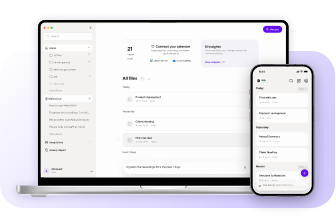
Open a processed recording in Desktop and select Transcript, Summary, or the report you need. Use the available edit control, save, and reopen. Choose Share/Export and a supported format, then inspect the file. App-only device settings remain in the mobile App.
What is Storage & Sync, and how do I clear App storage?
Open Profile → Devices & Storage → Storage & Sync. Review the cloud-sync information and the Storage section. Select Clear app storage only after reading its confirmation. Cleanup targets recoverable local copies/logs; it is different from deleting a recording or account.
What is Memoket Desktop, and how do I start using it?
Download the matching Mac or Windows installer from the official Downloads link, install it, and sign in with the same Memoket account. Create a short recording or import audio, then check upload and processing. Desktop has its own version; App 1.5.0 does not identify the Desktop version.
How do I create or rename a folder?
On Home, open the folder filter → Add folder, enter a name, and confirm. To rename an editable folder, swipe its row to reveal Rename and save the new name. System folders may not be editable. To organize a recording, use its ··· → Move to folder and select the destination.
Which versions do these instructions cover?
Current steps follow App 1.5.0 and include features released since September 2026. iOS versions (US App Store dates): 1.2.5 · 3 Sep; 1.2.6 · 7 Sep; 1.2.7 · 9 Sep; 1.2.8 · 14 Sep; 1.2.9 · 20 Sep; 1.2.10 · 21 Sep; 1.3.0 · 2 Oct; 1.3.1 · 12 Oct; 1.3.2 · 20 Oct; 1.3.3 · 27 Oct; 1.3.4 · 29 Oct; 1.3.5 · 31 Oct; 1.3.6 · 3 Nov; 1.4.0 · 11 Nov; 1.5.0 · 22 Nov. Desktop uses a separate version sequence.